Morningstar DesignWorks, LLC · Release 1.0
Machinist’s Hammer Bench
Configure a soft-face hammer — or a hand tapper with no handle at all — and get the detail prints out the other side. Handle, ferrule, cap, housing, inserts, seal: every part the build earns, drafted from the same profile the solid is built from, so the views and the dimensions cannot disagree with each other.
From $39Instant download · one HTML file with the handbook built in · shop, product and site licenses
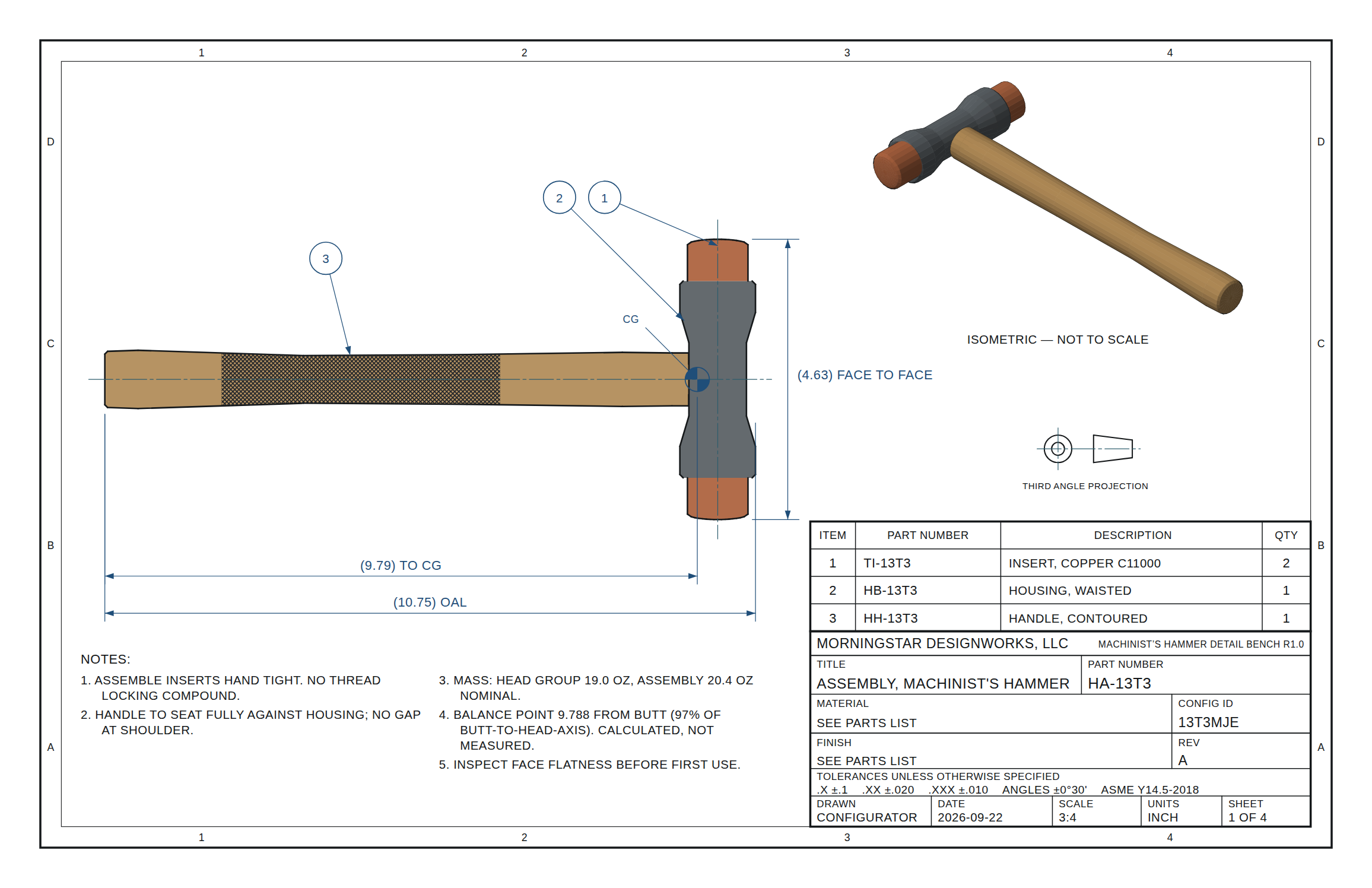
numbered and cross-referenced
off the geometry
hammer, or hand tapper
offline, yours
What it is
A drafting bench, not a picture generator
Hand-drafting a family of parts is not hard. Keeping the family consistent is. Change a barrel diameter and you are hunting through four sheets for the callouts that no longer agree, and the one you miss is the one the shop cuts to.
This bench draws every view from one profile model. The front view, the right-side view, the section and the isometric are four readings of the same list of stations. Dimension text is the parameter you set, formatted — never a number measured off a drawing. There is no path by which a sheet can drift out of step with the model.
A hammer, or a hand tapper
The same bench draws a mini tapper: housing and two inserts, no handle and no hole for one, held in the fingers to nudge a part against a stop inside the jaws of a vice. Solid through the middle, every housing style and every insert, and the set drops to three sheets because there is no handle to draw.
Six housing styles
Cylindrical, hex, waisted, deep cove, square with turned ends, and a shot-tube dead-blow housing whose bolt circle is solved for maximum charge.
Wood that carries no thread
A hickory handle seats in a turned ferrule of the housing's own material, held by two brass pins crossed at ninety degrees and match-drilled at assembly. The wood bears in compression; the pins only take rebound.
Real section views
Material minus voids, with opposite lining for the two materials in a bonded or molded dead-blow insert.
Mass and balance
Integrated from the profiles, bores and cavities taken out. The balance moves as you work.
Your initials, cut not printed
An engraved monogram on the housing flat, in four letterforms, as outlines on their own DXF layer — so a laser or an engraver follows the same artwork the drawing shows.
Notes you can actually read
Type has a floor. What will not fit under the views at a readable size goes to a continuation sheet with the whole page to spread into, and each sheet says where the other half is.
Checks that mean something
Wall thickness, bore interference, restitution against target. Each one quotes the number it is based on.
A box drawn to the hammer in it
A hardwood presentation box, hogged out so the groove follows this tool’s own outline rather than a rectangle it rattles around in: pockets for two spare tips, foam under the lot, brass hinges and magnets called out by part number, and the company name engraved in the lid. Two more sheets, and every piece of it a named solid in the same STEP.
Spares that are their own parts
Each spare tip gets its own part number, its own material and its own snugging — flats, knurl or a pin spanner, chosen per pocket. Drill one for a spanner and the wrench joins the set and travels in the box, because a part that ships needing a tool ships with it.
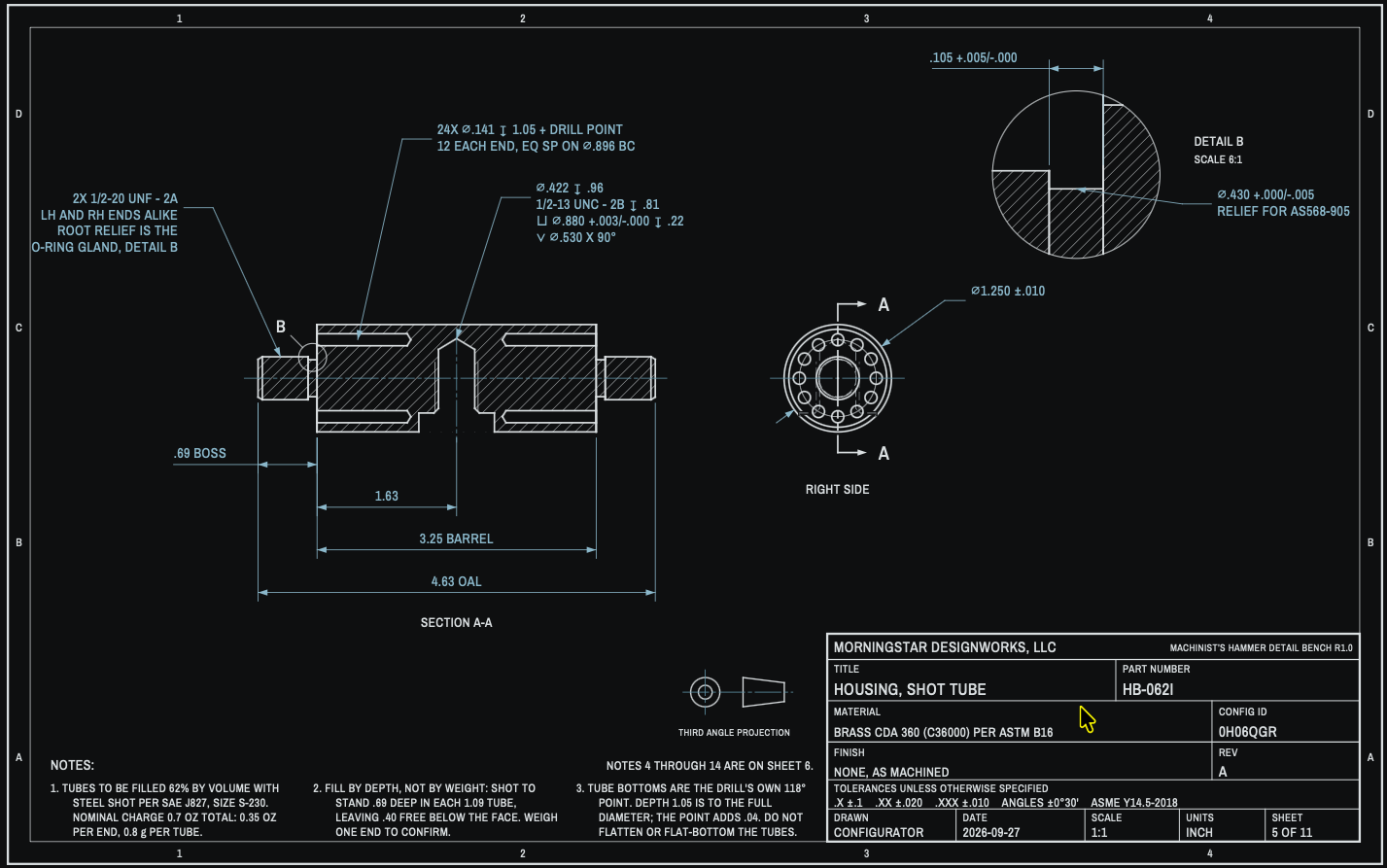
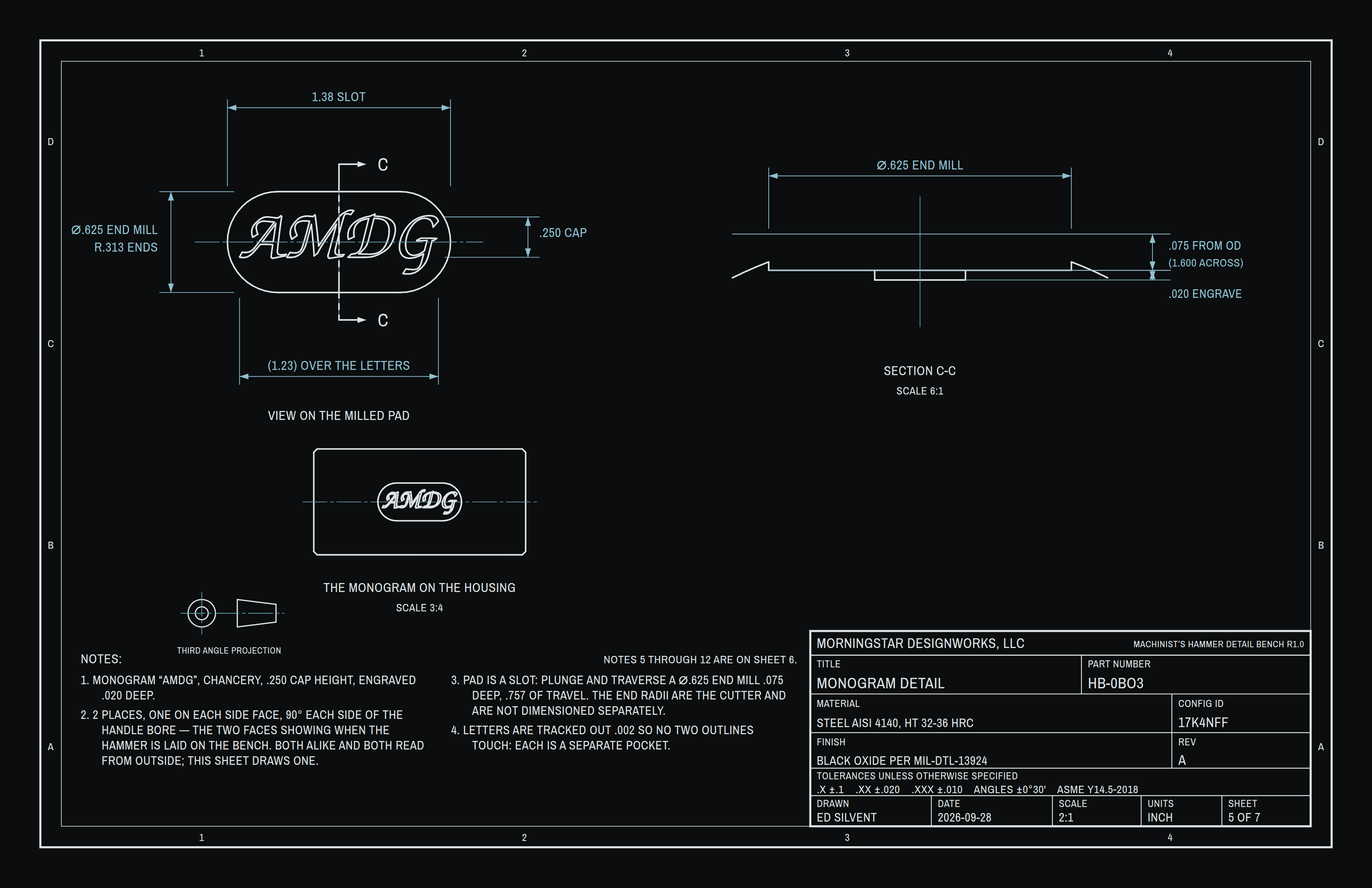
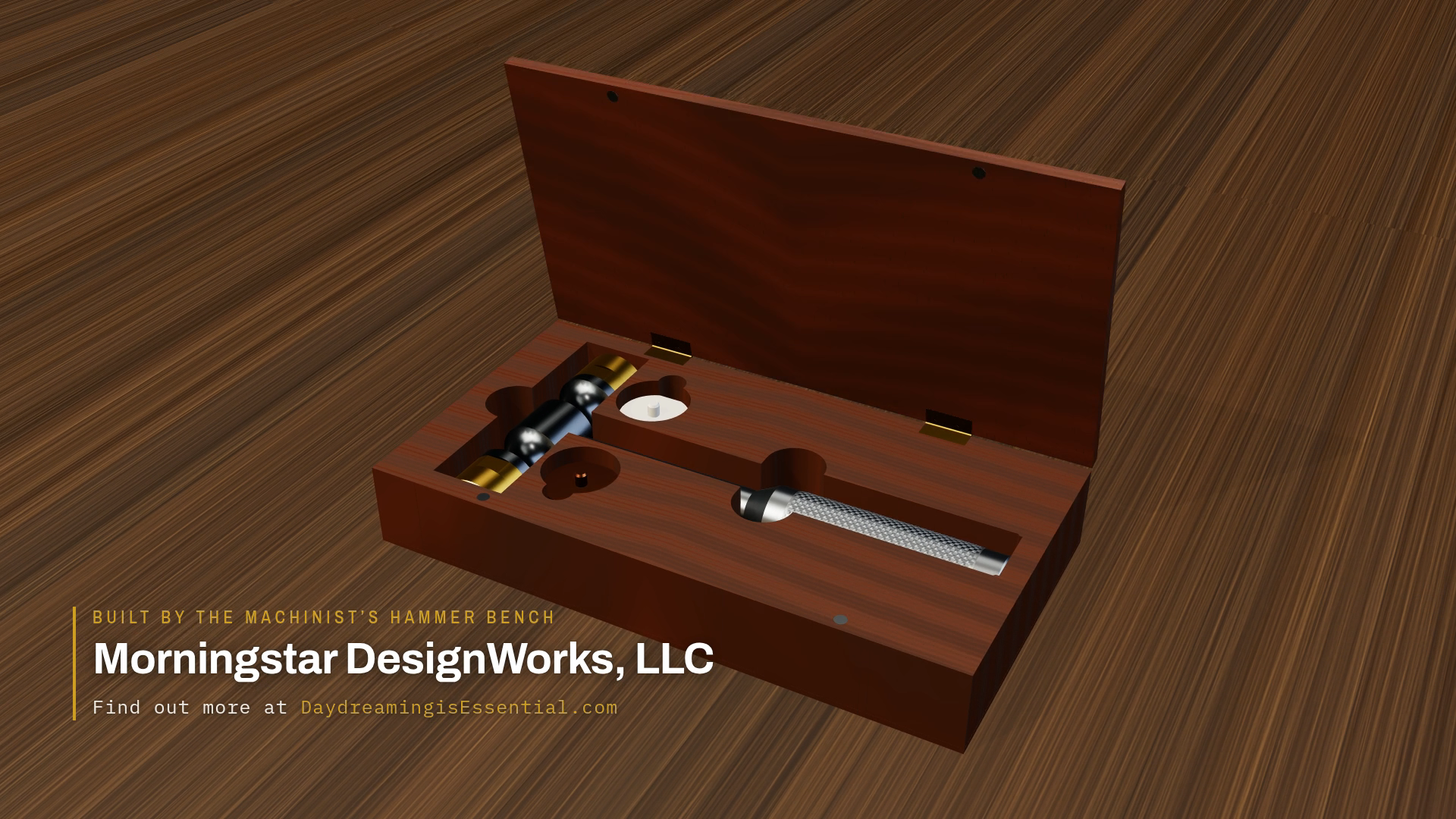
From the bench to the machine
The STEP file is a solid, and the monogram is a toolpath
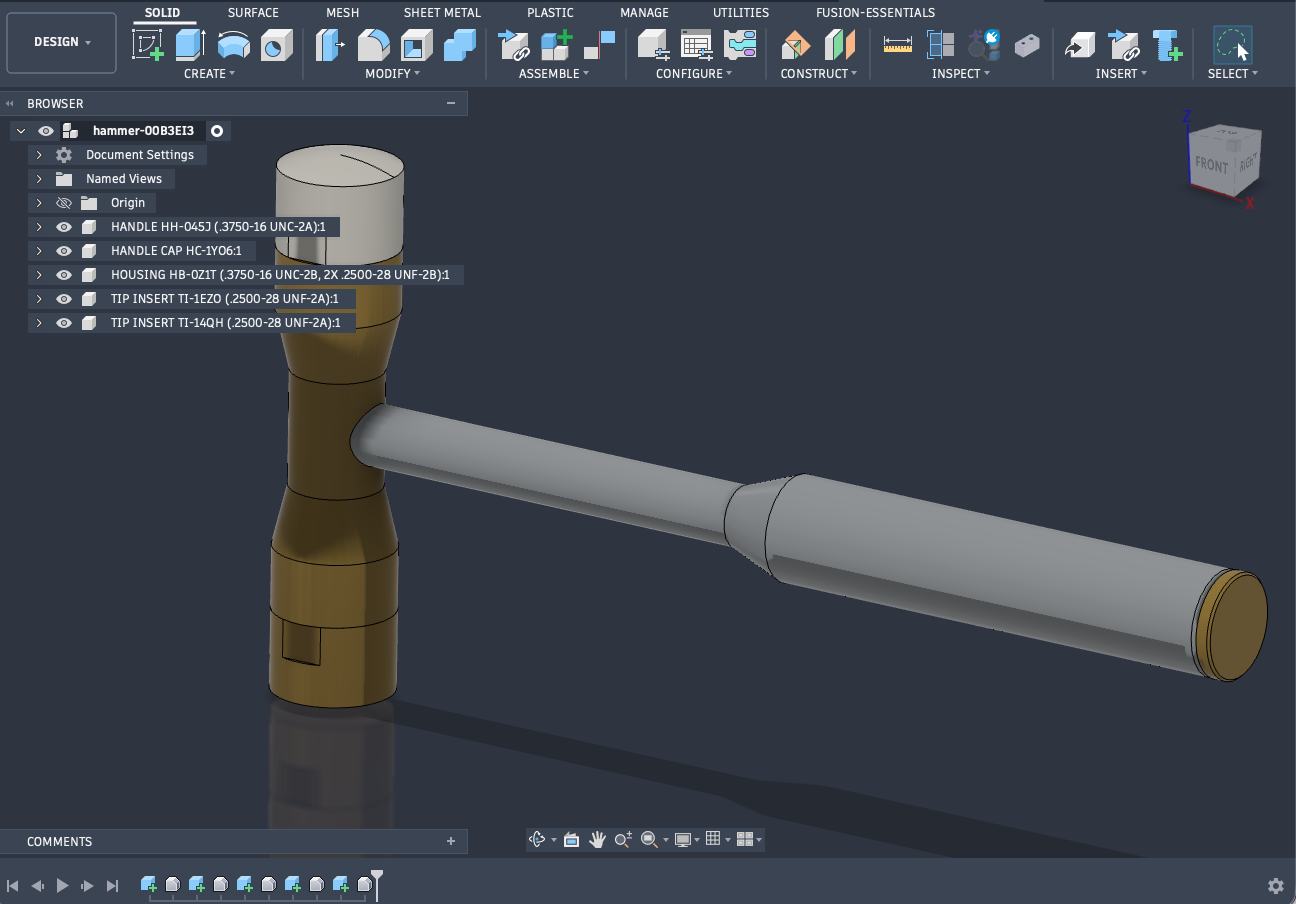
A drawing tool that exports something CAD refuses to open has not exported anything. The STEP is AP214 with real B-rep solids in inches, one body per part, named and placed in an assembly tree — so it opens, measures, and can be cut from.
Here it is doing both: the parts opened in Fusion exactly as the bench wrote them, and the engraved monogram taken straight through to a toolpath and cut.
Guided tour
Change a number. Watch the sheets follow.
Nineteen stops through the bench, from a plain cylindrical hammer to a dead-blow build, a flush joint, a square turned-end head, a hand tapper with no handle at all, and the solid model that comes out the back. Every frame is a sheet the bench drew itself, captured as it ran — watch the dimensions, the mass and the balance update with each change.
Stop 01 / 18
- Head
- Assembly
- Balance
- Length
- Eff. e
This is a recording of the bench’s own output, not a copy of the bench: every frame was decoded and checked against the sheet the tool itself drew, and all 58 match exactly. Arrow keys step through it; space plays and pauses. It does not cover the wooden handle, the engraved monogram, the spanner wrench or the presentation box, so the bench draws more sheets than you will see here.
Specifications
The detail
- Builds
- full hammer, or a mini tapper with no handle
- Sheets
- 3 for a tapper, 4 for a plain hammer: assembly,
handle, housing, tip insert
up to 11, as the build earns them: handle ferrule, handle cap, monogram, O-ring, spanner wrench, gift box body and lid
plus a continuation sheet wherever the notes will not fit at a readable size - Sheet size
- ANSI B, 17 × 11 in
- Projection
- third angle
- Annotation
- ASME Y14.5-2018
- Housing styles
- 6
- Housing materials
- 4: 1018, 4140 HT, 6061-T6, brass 360
- Handle materials
- 4, including hickory in a ferrule
- Grip forms
- 4, each with 4 surface finishes
- Face sizes
- 11, from 3/8 to 1-3/4 in
- Face forms
- flat, or a true spherical crown
- Insert materials
- 10, including 3 dead-blow
- Monogram
- 4 letterforms, engraved, on its own DXF layer
- Output
- SVG true size · DXF R12, layered · STEP AP214 solids
- Printing
- all sheets, one per page
- Runs in
- any current browser, offline
- Delivery
- one HTML file
- Second screen
- the sheet opens in a window of its own and follows the controls live
- Presentation box
- hardwood, cut to the tool’s outline, two spare pockets · optional
- Handbook
- built in, fourteen sections
Get it
One file, three licenses
Every license downloads the same file with everything in it. What differs is what you are allowed to do with the drawings that come out.
- Six housing styles — cylindrical, hex, waisted, deep cove, square with turned ends, and a shot-tube dead-blow with a solved bolt circle — in four materials.
- Ten insert materials on eight face sizes, flat or crowned, with a straight or coved body, including three dead-blow pads on an aluminum carrier.
- Four grip forms — straight, contoured, flared butt and a fat grip — in four surface finishes, each turned to a stem that registers in the housing.
- A hickory handle that carries no thread, seated in a turned ferrule of the housing's own material and pinned with two brass pins crossed at ninety degrees. Wood, ferrule and pins each get their own number and their own sheet.
- An engraved monogram in four letterforms, drawn as outlines on their own DXF layer with a section that shows both depths, so the print, the DXF and the cutter follow one piece of artwork.
- A mini tapper as well as a hammer. The same housing and the same inserts with no handle and no bore for one — solid through the middle, held in the fingers, for nudging work against a stop where a hammer cannot reach. One button; the handle sheets leave the set and the notes, the mass and the balance all follow.
- Three sheets for a tapper, four for a plain hammer, nine at full house — assembly, handle, housing and tip insert always; then a ferrule sheet for a wooden handle, a cap sheet for a gun-drilled one, a monogram sheet, an O-ring sheet with the AS568 sizes tabulated, and a spanner wrench cut to your own insert. Numbered from the configuration and printed as a set.
- Notes that stay readable. Type has a floor, and the sheet count gives way instead: what will not fit under the views moves to a continuation sheet, in build order, with a line each way so no reader is left wondering whether he has all of them.
- Mass, balance and restitution, calculated live from the profiles as you work.
- SVG and layered DXF, with single-line text so the callouts stay editable in CAD.
- A STEP model of every part, exact solids in inches, to open in your own CAD program and refine.
- A second-screen window. Send the sheet to a window of its own, drag it to the other monitor, and it follows the controls live — drawing on one screen, knobs on the other.
- A fourteen-section handbook built into the file, opened from the header, readable offline.
Shop license
One person · hobby shop, one-man shop
- One named person, on as many of their own machines as they like.
- Make as many hammers as you want and sell every one of them, commercially, with no royalty and nothing to report.
- The prints are for your own bench. Not for a company’s released documentation.
Instant download · free Release 1 updates
Read the shop license Get the shop licenseProduct license
One named company · a hammer in your catalogue
- A named company, up to five people in it.
- Everything the shop license allows, and the drawings may go into your released documentation — a controlled drawing set, a supplier package, a customer submittal.
- Invoice in your company’s name for the books.
Instant download · free Release 1 updates
Read the product license Get the product licenseSite license
One location, any number of people · set up to your standards
- Everyone at one location, no seat count.
- Everything the product license allows, and we set it up to your standards: your alloys and densities in the materials list, your thread classes, your finish specifications.
- Talk to a person first. Purchase orders welcome.
Setup is a conversation, not a download · allow a few days
Read the site license Email about a site licenseThe shop and product licenses are the same file and the same features — nothing is withheld from the cheap one, and there is no key, no activation and nothing that phones home. It runs offline because that is the point of it. What you are buying above the shop license is the right to put the output into a company’s drawing system, and an invoice that says so. The site license is different in kind: it is a bench built to your alloys, thread classes and finishes, so it begins with an email and a conversation rather than a checkout.
Questions
Before you buy
Is there a free demo?
No. The tour above is the closest thing, and it is deliberately a recording: every frame is a sheet the bench drew, captured as it ran. It shows you exactly what the output looks like and how it moves, but it cannot be driven to draw your own part.
Do I need CAD?
No. It is one HTML file that runs in a browser, offline, with nothing to install. If you do use CAD, the DXF comes out on named layers with single-line text, so the callouts stay editable rather than arriving as outlines, and Download STEP gives you the parts as solids to carry on modelling.
Can I cut parts straight from the output?
You can machine from the prints, which is what they are for. What you cannot do is treat them as a released drawing without reading them: the datum scheme, the tolerance block and the thread class are template decisions baked in once per part family, not judged for your job. The handbook says exactly what is and is not being decided for you.
Will the STEP really open in Fusion?
Yes, and the screenshot above is that file, not a render of it. It is AP214 with B-rep solids in inches, one named body per part in an assembly tree, so it arrives as geometry you can measure, section and cut from rather than as a mesh. The engraving video is the same route carried through: the monogram outlines off the housing sheet, into Fusion Manufacturing, out as a toolpath.
Is the mass figure real?
It is integrated from the profiles frustum by frustum, with the bores and cavities taken out, so it is as good as the geometry. It does not know about coatings, thread reliefs or the plug in a gun-drilled butt. Treat it as a design number and weigh the first one you build.
What does the dead-blow option actually do?
It swaps the insert thread round so the housing carries a male boss and the insert carries the tapped hole, fills the barrel with a solved bolt circle of shot tubes, and reports the effective restitution against a 0.10 target. When the geometry cannot reach the target it says so and names the face materials that can — rather than drawing a decorative chamber and leaving you to find out on the bench.
Can I sell the hammers I make with it?
Yes, on every license including the $39 one. The parts you draw are yours, you owe no royalty and you report nothing. The tool itself is not for redistribution, and updates within the release you bought are free.
Then what is the $199 license for?
Putting the drawings into a company’s system. The shop license covers one person selling what they make at their own bench; the product license covers a named company issuing these sheets as controlled documents — into a drawing register, a supplier package, a customer submittal — and gets you an invoice in the company name. If you are one person making hammers, the $39 license is the right one and we are not going to pretend otherwise.
Change one number and watch every sheet follow
That is the whole argument. Everything else in the bench exists to make sure the number you read is the number you set.
Get the bench — from $39